

- Website maintenance is the ongoing work that keeps a site fast, secure and current after launch - technical updates, security, content and SEO.
- It matters because the WordPress ecosystem saw 11,334 new vulnerabilities in 2025 (Patchstack), and many users will not return after a bad experience.
- Cost depends on the site: roughly 15-30 EUR/hour or 25-150 EUR/month. A small business site needs 1-3 hours a month; a Next.js site needs 0-2.
- Do the content yourself; leave technical work to a specialist. Proactive upkeep is far cheaper than an emergency fix, where the average data breach now costs 4M EUR (IBM 2025).
The site is live. The domain is working. Customers are coming in. Job done? Not quite.
A lot of business owners think the work ends the day the site goes live. The data says otherwise: a single security breach now costs €4M on average (IBM, 2025), and a slow or neglected site quietly bleeds customers through downtime and poor speed. In this article you will learn exactly what website maintenance covers, why it matters, how much it costs, and when it makes sense to hire a specialist.
11,334 new vulnerabilities in the WordPress ecosystem in 2025
That is a 42% jump compared to 2024. 91% of the vulnerabilities sit in plugins. Without regular maintenance, your site is a sitting target.
Source: Patchstack 2026
What is website maintenance?
Website maintenance is everything you do to keep the site running properly, quickly, and securely after it goes live. That includes technical updates, hacker protection, content updates, and SEO monitoring.
Think of your site like a car. You do not drive it for 5 years without changing the oil, checking the brakes, or getting it inspected. The same goes for a website - without regular care, it gets slow, vulnerable, and loses ranking in Google.
If the website is a shop, maintenance is the cleaning, restocking the shelves, replacing the busted lightbulbs, and locking the door at night. Skip that and you get chaos.
The need is not theoretical. Patchstack logged 11,334 new vulnerabilities in the WordPress ecosystem in 2025 - a 42% jump over 2024, with 91% of them hiding in plugins (Patchstack 2026). Every one of those is a door someone has to keep locked.
Important: Maintenance is not a one-off task. It is an ongoing process that makes sure your site runs at its best and delivers results for the business.
Why is maintenance critical?
Here is what the 2025 data says, and why a neglected site is a ticking time bomb:
~5 hrs
median time before a new vulnerability is exploited (Patchstack)
€4M
average cost of a data breach (IBM, 2025)
"Maintaining a website is just as important as building it. I've seen too many neglected sites turn slow, insecure, and outdated within a year - and customers judge a business by exactly that."
- Todor Todorov, Coding Turtles
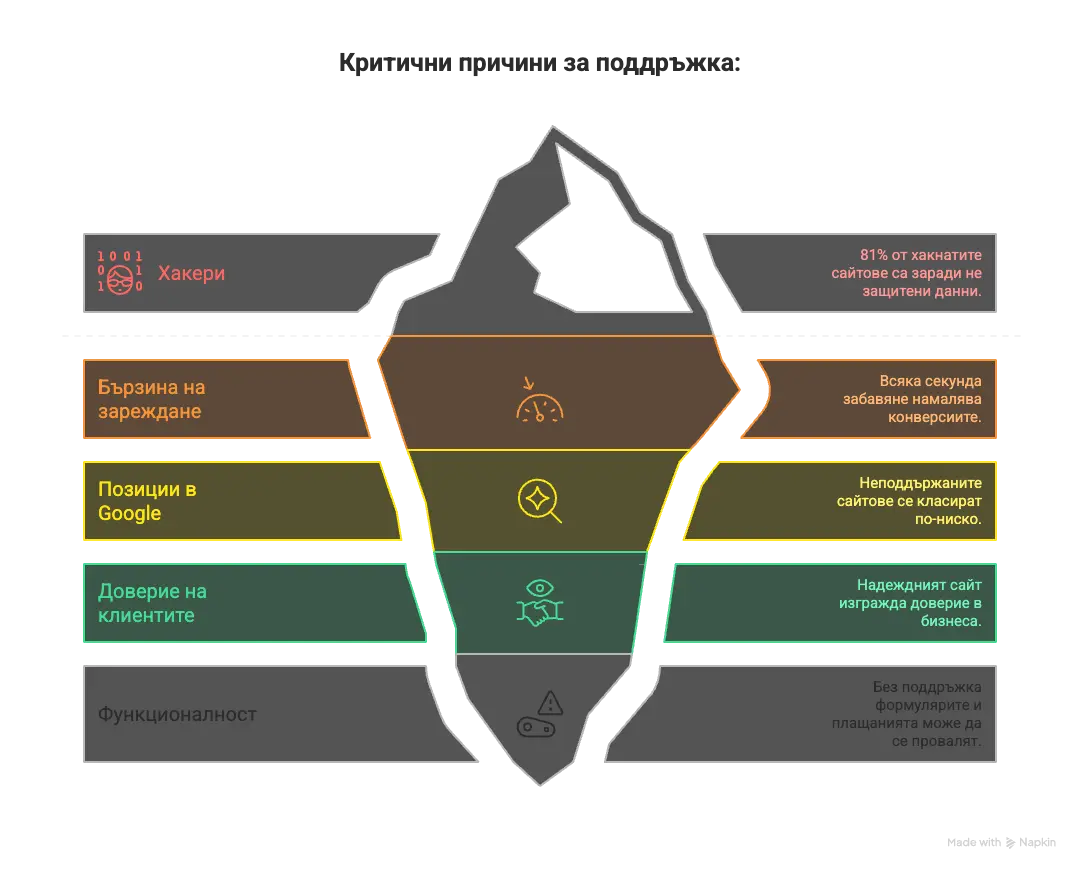
Five critical reasons to run regular maintenance:
1. Protection from hackers. According to Verizon's 2025 Data Breach Investigations Report, stolen credentials are involved in roughly a third of breaches. On top of that, the WordPress ecosystem saw 11,334 new vulnerabilities in 2025 - roughly 200 a week (Patchstack). Hackers run automated scripts that scan millions of sites for known holes, and Patchstack reports the median time to first exploitation is about five hours. Skip the updates and you are easy prey.
2. Load speed. Over time, sites accumulate "junk" - unoptimised images, outdated plugins, a fragmented database. The result? According to Think with Google, the chance a mobile visitor leaves rises 32% as load time grows from 1 to 3 seconds, and 90% by 5 seconds. See how site speed affects SEO and sales.
3. Google rankings. Google favours sites that get updated regularly and load fast. Core Web Vitals has been an official Google ranking signal since 2021, so a slow, neglected site is competing with one hand tied behind its back.
4. Customer trust. Outdated prices? A phone number that does not work? Broken links? A reliable, current website is one of the strongest trust signals a business has - and first impressions form in a fraction of a second.
5. Functionality. Browsers update constantly. PHP versions change. Without maintenance, forms can stop working and payments can fail. That means a direct loss of revenue and customers.
What happens if you DO NOT maintain your site?
The site gets slow > you lose customers (53% leave after 3 seconds) > outdated software > hacker attack > data loss > Google demotes you > you lose organic traffic > worst case: a hacked site spams from your name and your domain ends up on blacklists.
What are the three types of website maintenance?
Maintenance is not a single thing - it breaks down into three core categories. Each one is important for a different side of the site's success. Speed alone is a hard number: a 100-millisecond delay can cut conversions by up to 7% (Akamai, 2017), so neglecting any one category quietly costs you money:
1. Technical maintenance
This is the "mechanics" of the site - everything "under the hood". Without it, the site is vulnerable and slow. Technical maintenance covers:
- Updating the CMS (WordPress, Joomla, etc.) and plugins
- Regular backups - weekly, or daily for online stores
- SSL certificate and HTTPS setup
- Hacker protection - firewall, malware scanning
- Speed optimisation - caching, compression, CDN
- 24/7 uptime monitoring - alerts when something breaks
- Core Web Vitals optimisation
- Bug fixes and technical patches
2. Content maintenance
Everything visitors actually see - text, photos, prices, news. Outdated information hurts trust and conversions. This covers:
- Updating prices, opening hours, contact info
- Adding new pages and services
- Publishing news and blog posts
- Swapping out and optimising images
- Adding products (for online stores)
- Editing outdated or incorrect information
3. SEO maintenance
Search engine optimisation is not a one-and-done job. Algorithms shift, competitors push harder, and without ongoing SEO maintenance even the best site loses ground:
- Tracking Google rankings for important keywords
- Optimising meta titles and descriptions
- Updating sitemap.xml and robots.txt
- Google Search Console - watching for errors and issues
- Fixing broken links
- Competitor analysis and new opportunities
- Monthly SEO reports with recommendations
How much does website maintenance cost?
Prices vary widely depending on the type of site and the working model. In Bulgaria there are two main models:
Monthly retainer (25-150 EUR): You pay a fixed amount every month, regardless of the workload. Good for online stores with frequent changes and high-traffic sites. The downside - you pay even when there is no work.
Hourly (15-30 EUR/hour): You pay only when there is actual work to do. Perfect for small sites, Next.js or static sites, and businesses with unpredictable budgets. This is the model we work with - full control over what you spend.
Expected costs by site type:
| Site type | Typical maintenance | Monthly cost* |
|---|---|---|
| Landing page (1-3 pages) | 0-1 hours/month | 0-30 EUR |
| Business site (5-15 pages) | 1-3 hours/month | 15-90 EUR |
| Corporate site (20+ pages) | 3-6 hours/month | 45-180 EUR |
| Online store | 5-10 hours/month | 75-300 EUR |
| Next.js site | 0-2 hours/month | 0-60 EUR |
*At 15-30 EUR/hour rates. These costs are separate from the initial build investment.
ROI of professional maintenance
The math favours prevention: proactive repairs are far cheaper than reactive emergency fixes, and the average data breach now costs 4 million EUR (IBM 2025). A single prevented outage often pays for months of maintenance.
DIY or hire a specialist?
It depends on your technical skills, the time you have, and the type of site. Here is the honest comparison:
Doing it yourself makes sense if you have technical know-how, the site is simple (a brochure site, no online payments), and you have 2-4 hours a month for maintenance. Upsides: lower cost, full control, you learn how the site works. Risks: mistakes can "break" the site, it eats time away from the business, and there is a real risk of getting hacked if you miss an update.
With a specialist is the better call if the site is mission-critical (it brings in customers and sales), you do not have the technical background, or you just do not have the time. Upsides: professional care, fast response when something goes wrong, peace of mind. It pays off too - proactive repairs run far cheaper than reactive emergency fixes.
Our take: Content updates (prices, photos, copy) you can handle yourself - most platforms have a simple admin panel. But technical maintenance (updates, security, speed) should go to a specialist. Mistakes here get expensive fast.
Tip: We work on an hourly basis - you pay only for the work that actually gets done. For Next.js sites like ours, monthly costs are minimal or zero.
WordPress vs Next.js: which technology needs less upkeep?
Not every site is the same. The technology a site is built on determines how much maintenance it will need. WordPress is everywhere (about 42% of all sites on the internet) but it needs constant care. Next.js is the modern alternative with minimal maintenance. For a full breakdown of the two technologies, see WordPress vs custom website.
| Criteria | WordPress | Next.js |
|---|---|---|
| Security | 11,334 vulnerabilities/year, 91% in plugins | No database, no plugins = minimal risk |
| Speed (PageSpeed) | 40-70 (average) | 95-100 |
| Updates/month | 10-20 (core + plugins + themes) | 0 updates needed |
| Monthly maintenance | 3-6 hours typical | 0-2 hours (content only) |
| Risk of "breaking" | High - plugin conflicts, PHP errors | Minimal - static content |
Why do we build with Next.js? Our sites are fast by default (95-100 PageSpeed), secure (no database or plugins that can be hacked), and need very little maintenance. Result: lower monthly costs for you, fewer headaches.
Interactive maintenance checklist
Use this checklist to track regular maintenance on your site. Click each item to mark it as done:
Checked: 0 of 10
Bottom line: maintenance is an investment, not an expense
The data is clear: a neglected site costs you much more than regular care - in the form of hacker attacks, lost customers, missed sales, and reputational damage.
Technical maintenance protects you from 11,334+ vulnerabilities a year. SEO maintenance keeps your rankings stable as algorithms shift. And the ROI is straightforward: proactive repairs are far cheaper than emergency fixes.
Pick the right technology (Next.js needs less maintenance than WordPress), check the site regularly, and if you do not have the time -get professional help.
Sources
- Patchstack: State of WordPress Security 2026 (accessed June 2026)
- IBM: Cost of a Data Breach Report 2025 (4M EUR average) (accessed June 2026)
- Think with Google: Mobile Page Speed - New Industry Benchmarks (accessed June 2026)
- Akamai: State of Online Retail Performance (Spring 2017, 100ms delay = up to 7% fewer conversions) (accessed June 2026)
- Verizon: 2025 Data Breach Investigations Report (stolen credentials in ~1/3 of breaches) (accessed June 2026)
- Sucuri: Hacked Website & Malware Threat Reports (accessed June 2026)
Frequently asked questions
Need professional maintenance?
We work on an hourly basis - you pay only for the work that actually gets done. No monthly subscriptions, no hidden fees. Peace of mind for you, care for the site.
Get in touch